AI-enhanced listing photos and the rules that govern them — a working agent’s guide to disclosure
Four layers of rules in 2026 — federal, state, NAR ethics, and local MLS. Which edits require disclosure, the one-line MLS-remarks template, the California rule that went live January 1, 2026, and the audit trail every working agent should keep.
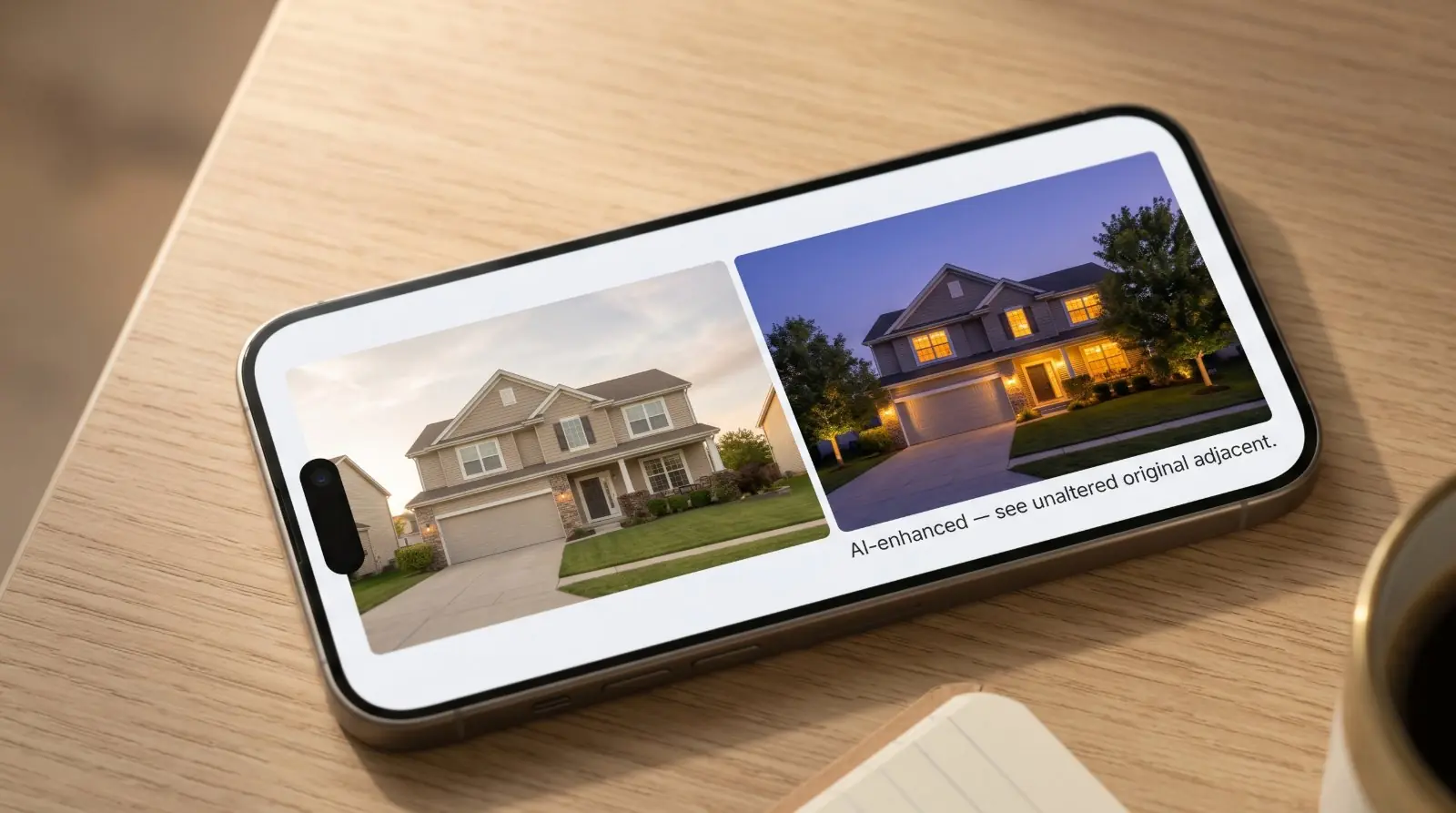
A buyer arrives at a showing and the house in the photos doesn’t quite match the house in the driveway. The sky was bluer in the listing photo than it is today. The grass was greener. The kitchen looked brighter. The buyer doesn’t know exactly what changed, but the gap is there, and the gap is what erodes trust.
AI photo enhancement has made this gap larger, faster. A daytime exterior rendered to twilight, a flat sky replaced with a dramatic one, a dim interior brightened until the windows glow — all of this is now a 10-second operation rather than an hour in Lightroom. The capability has outpaced the convention. Most agents using these tools haven’t been told clearly what they need to disclose, and most disclose either too much, too little, or in the wrong place.
The regulatory landscape isn’t waiting:
For the rest of the country, federal deceptive-advertising rules, the Federal Fair Housing Act, the NAR Code of Ethics, and local Multiple Listing Service policies already create real compliance obligations. This article walks through all four layers, lists which edits require disclosure and which don’t, gives the disclosure templates that satisfy the rules, and explains why disclosure is a competitive advantage in 2026, not a compliance burden.
The four layers of rules
In 2026, an AI-edited or digitally altered real estate listing image is governed by four overlapping layers of rules. Compliance means satisfying whichever layer applies most strictly. Most working agents only think about one or two of them; the article that helps an agent stay out of trouble has to cover all four.
Layer 1 — Federal
The federal layer applies in every state.
Federal Trade Commission. The FTC treats AI in real-estate advertising exactly the way it treats traditional advertising — there is no AI exemption. Under Section 5 of the FTC Act, the longstanding rules against deceptive or unfair practices apply fully. The FTC’s three-part standard: every claim in an advertisement must be truthful, substantiated, and clearly disclosed. For a real estate listing, an edited image that materially misrepresents property condition, features, room size or layout, fixtures, finishes, views, surroundings, included items, amenities, defects, or renovation status can be treated as deceptive advertising under federal law — regardless of whether state law has caught up.
Federal Fair Housing Act. Federal fair-housing rules prohibit housing advertisements that indicate a preference, limitation, or discrimination based on protected characteristics. For AI-generated or digitally altered images, this matters in a specific way: AI-generated scenes can unintentionally introduce protected-class signals — people, families, children, religious objects, disability-related cues, ethnic or demographic signals, lifestyle scenes implying who the property is “for.” We treat this in its own section below because it’s the single most-missed compliance risk in AI photo workflows.
Layer 2 — State
Three US states have specific enacted legislation. Several more have proposed it or issued regulatory warnings.
California — AB 723 (enacted, effective January 1, 2026). California is the first state with a specific AI/digitally-altered real-estate-image disclosure statute now in effect. The law applies to brokers, salespersons, and persons acting on their behalf. It requires disclosure of digitally altered images in real-estate advertising and promotional materials, with the disclosure placed reasonably conspicuously on or adjacent to the altered image. It also requires that the unaltered original image be made available — for internet postings, by including the original alongside the altered version or by other means specified in the law.
AB 723 expressly includes AI use in its definition of digital alteration. It covers changes to a wide range of property elements: fixtures, furniture, appliances, flooring, walls, paint colour, hardscape, landscape, façade, floor plans, outside views, utility poles, streetlights, and neighbouring-property elements. It excludes ordinary non-substantive edits — lighting, exposure, cropping, straightening, colour correction, sharpening, white balance — so long as they do not change the representation of the property.
For California agents, AB 723 is current law. For agents in every other state, AB 723 is the rule worth treating as your default, because other states are likely to follow with similar legislation and AB 723’s standard is consistent with NAR ethics, federal deceptive-advertising rules, and best practice across the industry.
Wisconsin — § 452.136(1m), per 2025 Wisconsin Act 69 (enacted, effective January 1, 2027). The trigger condition is “creates a false or misleading impression” — narrower than California’s “any digitally altered image” rule but broader than the NAR ethics standard. In practice, the same disclosures that satisfy AB 723 will satisfy Wisconsin.
New York — high-watch jurisdiction. No enacted listing-image-specific AI disclosure statute as of mid-2026, but regulatory attention is clear. The New York Department of State has issued a public warning about AI-generated real estate listing images and deceptive-advertising risk. Senate Bill S9584 is currently in committee. Treat New York as a state where the rules are coming and the regulator is already watching.
Colorado — Senate Bill 189 (enacted, effective January 1, 2027). Colorado has enacted real-estate-specific AI legislation requiring disclosure when AI tools are used in real estate and housing applications. SB 189 takes effect on the same day as Wisconsin’s rule.
Other states. No enacted listing-image-specific AI disclosure statute in the remaining states as of mid-2026. That doesn’t mean no rules apply — federal deceptive-advertising law, federal fair housing, state license law, state advertising rules, state consumer-protection statutes, and common-law misrepresentation all still govern. The conservative move for any agent in any state: operate as if AB 723 already applies in your state.
Layer 3 — NAR Code of Ethics
The Code of Ethics applies to every member regardless of state, MLS, or brokerage. Two Articles and two Standards of Practice are the most relevant to AI photo disclosure.
Article 2 prohibits Realtors from “exaggerating, misrepresenting, or concealing pertinent facts relating to the property or the transaction.” A listing photo that materially misrepresents the property — a brown lawn rendered green, a missing fence digitally added, a flaw painted over — is an Article 2 violation regardless of disclosure.
Article 12 requires that Realtors present “a true picture in their advertising, marketing, and other representations.” This explicitly extends to images: any image used in marketing must accurately represent the property.
Standards of Practice 12-8 and 12-10 address website content, images, internet content, and the manipulation of listing content. They make Article 12’s “true picture” standard operational for digital and AI-edited images.
Combined, the standard is: if a buyer would form a different impression of the property from the edited photo than from an unedited one, the edit requires disclosure.
Layer 4 — Local MLS and brokerage policy
The local Multiple Listing Service and your brokerage each layer additional rules on top of federal, state, and NAR requirements. Some specifics worth knowing:
- — California Regional MLS (CRMLS) requires digitally enhanced, altered, or virtually staged images to be identified in the photo description, and the original unaltered image to appear immediately before or after the altered image in the listing.
- — San Diego MLS has issued guidance that AB 723 applies to MLS participants, subscribers, and vendors — including downstream uses through IDX, VOWs, APIs, and syndication. The disclosure has to travel with the image across channels.
- — Wisconsin Metro MLS has issued virtual staging guidance recommending that virtual staging be limited to furnishings and décor — not people, pets, lifestyle scenes, or signage.
These are examples, not an exhaustive list. Check your specific local MLS’s published rules on digitally altered images before publishing your first AI-edited listing photo. Whichever rule is most restrictive — federal, state, NAR, MLS, or brokerage — is the one that applies.
The federal fair-housing dimension — the most-missed risk
Most agents thinking about AI photo disclosure are thinking about the property-misrepresentation problem. There’s a separate category of risk that agents miss almost entirely: AI-generated scenes can introduce fair-housing violations without anyone intending them.
Federal Fair Housing law (24 C.F.R. § 100.75 and related regulations) prohibits housing advertisements that indicate a preference, limitation, or discrimination based on protected characteristics — race, colour, religion, sex, disability, familial status, national origin. The Fair Housing Act applies to every advertisement of every property; it doesn’t have an AI carveout.
In an AI photo workflow, the violations agents stumble into:
- — AI-generated people in a virtual staging. A scene with a family at a kitchen table, kids in a bedroom, an older couple in a living room — even if the AI generated them as a neutral lifestyle cue, the implication is this property is for this kind of household.
- — AI-generated religious objects. A cross, a menorah, prayer beads on a nightstand, a religious painting on a wall.
- — AI-generated children’s items. A high chair, a crib, kid art, sports gear staged in a bedroom.
- — AI-generated demographic cues. Cultural artwork, ethnic-specific décor, neighbourhood scenes implying demographic composition.
- — AI-generated lifestyle scenes implying “who this property is for.” Wine on a counter, baby toys in the corner, work-from-home setups, retirement-aged hobbies.
The honest practical rule: virtual staging that adds furniture and décor is generally fine, with disclosure. Virtual staging that adds people, religious objects, children’s items, or demographic-specific lifestyle cues is not. If your AI tool offers “scene” or “lifestyle” generation, leave those features off.
The edits that need disclosure
The categories of edit that NAR’s guidance, AB 723’s California rule, most other state real-estate commissions, and most brokerage policies require disclosure for:
The edits that don’t need disclosure
Disclosure templates — five versions for five situations
Most brokerages and MLS systems require disclosure in the listing remarks, in the agent’s standard disclosure paragraph, or as text on or adjacent to the altered image. The wording is shorter than agents expect. Pick the template that matches what was actually edited.
Template 1 — General catch-all
Adapt the bracketed list to what was actually edited. Don’t disclose edits you didn’t make.
Template 2 — Virtual staging
Template 3 — Twilight or rendered exterior
Template 4 — Conceptual rendering
Use this for any image showing proposed (not actual) improvements — finished basement concepts, renovation visualisations, proposed landscaping.
Template 5 — California-style (AB 723-compliant)
This is the format AB 723 specifically references. For California listings it’s the safer default. For listings in other states where AB 723 isn’t yet law but the broader compliance standard is “show the original alongside the altered version,” this template works nationally.
Show the unaltered original — the single best practice
If you remember one thing from this article beyond the templates: publish the original unaltered image adjacent to the altered version. This is California AB 723’s specific requirement for digitally altered listing images, and it’s emerging as the strongest national best practice.
The practical pattern in a listing gallery: slot N, the altered image (e.g., the virtually staged living room, the rendered twilight exterior); slot N+1, the unaltered original (the actual empty living room, the daytime exterior). Both images carry the same disclosure tag, and the relationship between them is clear to the buyer in the scroll.
This serves two purposes: it satisfies the AB 723 requirement for California listings, and it strengthens the credibility of the entire listing. A buyer who sees a clear disclosure paired with the unaltered photo extends trust to the rest of the gallery. A buyer who sees an enhanced image with no original to compare against assumes the worst about the rest.
Keep an audit trail — what to retain for every listing
If a complaint ever arrives — to your state real-estate commission, to NAR, to your local MLS, or in a buyer dispute — the question that decides whether you have a problem is: can you produce a clear record of what was edited and what was disclosed?
For every listing where AI photo enhancement was used, retain:
- — The original unaltered image, in its native resolution and format.
- — The edited image in the final form that was published.
- — The name of the tool or vendor that performed the edit.
- — A description of the edits made — at minimum, the category (virtual staging, sky replacement, twilight rendering, etc.).
- — The date the edit was made and the date the listing was published.
- — The disclosure wording used in the listing remarks and/or on the image itself.
- — A screenshot or saved copy of the final published listing as it appeared on the MLS and on at least one major portal.
- — Any seller approvals of the edited images, if your brokerage workflow includes them.
This sounds like a lot. In practice, it’s a single folder per listing in cloud storage that takes ten minutes to populate. The folder lives for at least the statute-of-limitations period for real-estate claims in your state — typically 2–6 years, but check your jurisdiction.
Disclosures get stripped — verify on every channel
A disclosure tag added to a photo in your MLS upload doesn’t automatically survive the journey to Zillow, Realtor.com, your brokerage’s website, and the agent’s social channels. Each syndication hop can strip, hide, or reformat the disclosure depending on the receiving platform’s rules.
For any AI-enhanced image you publish, verify the disclosure is visible on: the MLS listing display; the Internet Data Exchange (IDX) feed your brokerage uses; the Virtual Office Website (VOW) display; Zillow; Realtor.com; Redfin; any other portal you syndicate to; your brokerage’s own website; social media posts featuring the image; email campaigns.
If the disclosure is stripped on a platform, you have three options: use a disclosure overlay burned into the image itself (so it can’t be stripped); skip publishing the AI-enhanced version on that platform and use the unaltered original instead; or request the platform restore the disclosure (rarely effective). The first option is the most reliable across syndication.
Why disclosure is a competitive advantage
There’s a working assumption among some agents that AI disclosure is a compliance burden — a thing to do because the rules require it, even though buyers don’t care and it might hurt the listing. The data, what little of it exists, suggests the opposite.
Buyers already know AI editing exists. The 2025–2026 wave of AI photo tools has made AI editing common knowledge. Buyers assume some photos are edited. The question for the buyer is whether the agent is being honest about which ones. A clear disclosure signals “this agent operates above board.” A photo that’s clearly enhanced with no disclosure signals “this agent is hiding something.”
Disclosure makes the rest of the listing more believable. A buyer who sees a clear disclosure on the twilight exterior — and accepts it — extends trust to the kitchen photo, the primary bedroom, the floor plan. The disclosure isn’t damning the enhanced image; it’s certifying the rest.
The downside of getting it wrong is asymmetric. A missed disclosure on a substantively edited image can become a complaint to the state real-estate commission, or grounds for the buyer to back out of contract or sue post-closing. The downside of over-disclosing is, at most, that a buyer feels a little weird about one photo. The downsides aren’t comparable.
The grey-area edits
A few categories sit on the line. Honest answers, not legal advice:
- — Removing a parked car from a driveway in post. Most boards treat this as material alteration if the car was the seller’s; less material if it was a neighbour’s. If you do remove a car in post, disclose it.
- — Significantly brightening an interior that was actually quite dark. If the buyer’s in-person impression of the room will differ noticeably from the photo, you’ve crossed into material alteration.
- — Replacing a worn-looking front door in post. Material. Disclose. Or better: ask the seller about repainting it before the shoot.
- — Smoothing out a cracked driveway. Material. Disclose. Or shoot from an angle that minimises the cracks.
The rule of thumb: if a buyer arriving at the showing would say “this doesn’t look like the photo,” you needed to disclose. If they’d say “the photo just had better light,” you didn’t.
Disclosure tags applied automatically, audit trail you can defend.
Phone photos to market-ready listing images in 10 seconds. Twenty free when you sign up — no credit card.
One photo tip every Sunday.
Real techniques agents are using this week. No spam. Unsubscribe in one click.